Direct, don't edit.
Free download. 3 days of Mever Pro included — then Free forever. No card, no signup.
Free keeps editing with watermark + 720p + 5 exports/month.
Need more? $12/mo, anytime.
Mever is temporarily paused — downloads are unavailable right now.
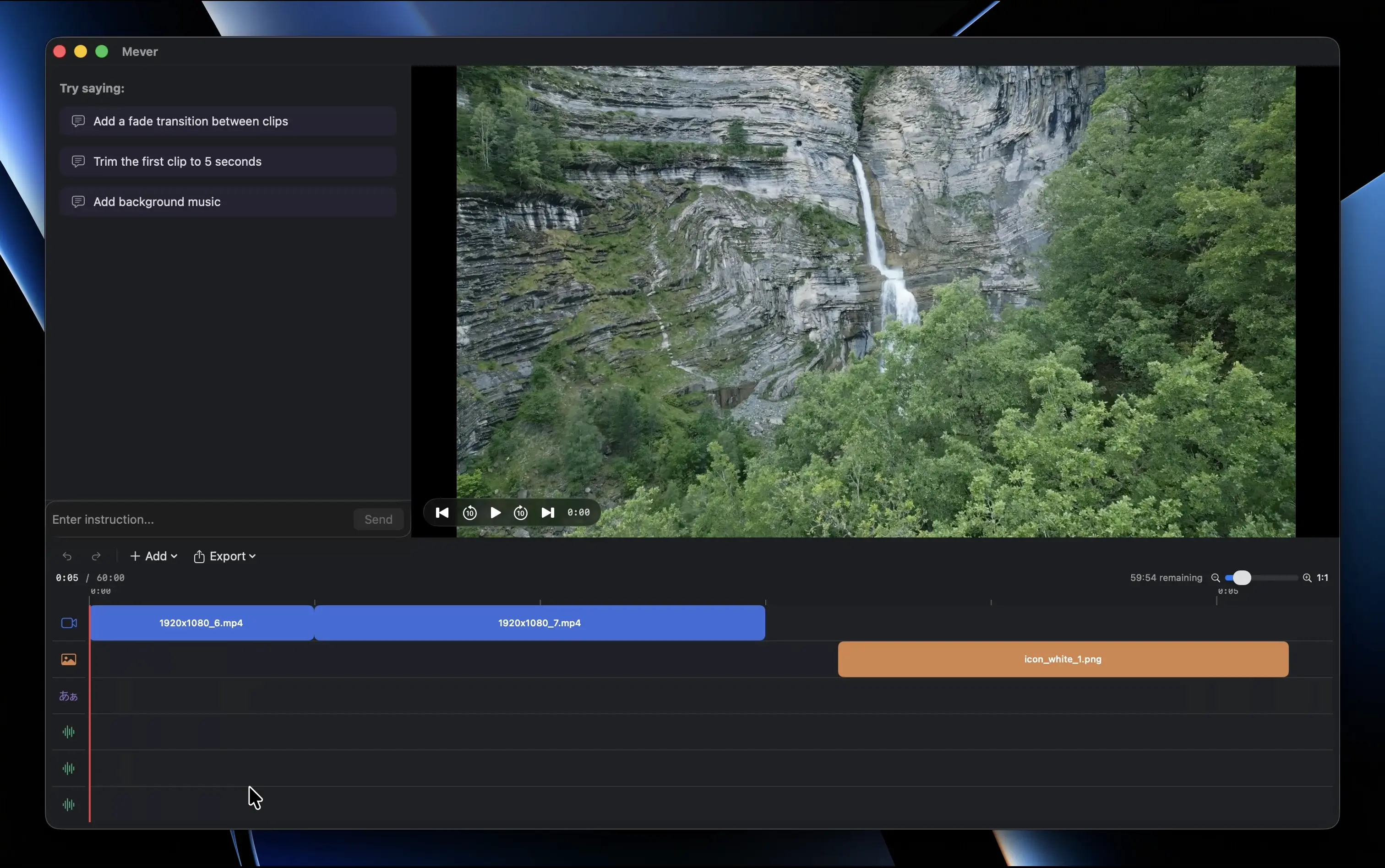
Video editing
without the learning curve
You have a story to tell. But between paywalls, credit limits, and 200-page manuals, the tools keep getting in the way.
CapCut's hidden costs add up
Credit limits that throttle your workflow. Subscription pressure that never lets up. And your footage routed through ByteDance servers.
Pro tools demand pro training
You quit CapCut only to hit a wall in DaVinci Resolve — color nodes, fusion pages, a UI built for Hollywood. Mever works with your words, not your timeline skills.
It's not a simpler editor. It's a different way to edit.
Describe what you want in plain language — the same words you'd use to explain your edit to a friend — and it happens.
Request your video edits with your words.
Watch them happen.
Mever can speed up intros, duck background music, trim clips, and export for YouTube — all by typing commands in plain language.
Mever is temporarily paused — downloads are unavailable right now.
Everything you need to edit,
nothing you need to learn
Every feature is built to get you from raw footage to a published video — without leaving the chat.
Plain-language editing
Describe your edit the way you'd explain it to a friend. Mever understands trimming, rearranging, speed changes, and more — in any language.
One-command export
Say where the video is going — YouTube, Shorts, or a quick share — and Mever picks the codec, bitrate, and resolution. No export settings to learn.
Speed, trim, duck — repeat
Speed up intros, trim dead ends, auto-duck background music when you talk — handle the repetitive tasks that slow you down, all by typing a single command.
Local & private
Video processing happens on your machine. Only the text of your commands is sent to interpret them. Your footage never leaves your computer.
Every feature above is unlocked during the 3-day Pro Trial. After the trial, Mever stays free — keep editing with a Mever watermark, 720p exports, and a monthly AI budget. Your projects and footage are never touched. See what's included.
Your footage stays on your Mac
Mever processes video locally using your hardware. Only the text of your editing commands is sent to our API so we can interpret them. Your footage is never uploaded, never stored on a server, and never used for training.
Free, with 3 days of Pro on us
Free to download. Every install starts with 3 days of Mever Pro, then keeps editing on Free. Upgrade for 20,000 AI credits/month and clean exports.
Free
Keep editing forever — with a monthly budget.
- Watermarked exports
- 720p resolution
- 5 exports / month
- 1,000 AI credits / month
- Local-first editing
- All edit operations
Mever is temporarily paused — downloads are unavailable right now.
Trial
Try every Pro feature for 3 days. Nothing to enter.
- All Pro features for 3 days
- No card required
- No signup, no email
- Auto-converts to Free — never auto-charges
Mever is temporarily paused — downloads are unavailable right now.
Mever Standard
20,000 AI credits/month, no watermark, up to 4K.
- Unlimited exports
- Up to 4K resolution
- No watermark
- 20,000 AI credits / month
- Priority support
Mever is temporarily paused — new subscriptions are unavailable right now.
No account, no credit card. Your projects, footage, and exports stay on your Mac.
Frequently asked questions
Do I need to pay or sign up to start?
No. Download Mever and use it — no email, no credit card, no account. You only enter payment details if you choose to upgrade to Standard for 20,000 AI credits/month and clean exports.
Is there a free trial of the Pro features?
Yes. When you download Mever you automatically get 3 days of Mever Pro — Pro features (20,000 AI credits, up to 4K, no watermark) — with no card and no signup. After 3 days you switch to the Free plan: your projects stay, you keep editing, and exports get a Mever watermark, cap at 720p, and are limited to 5 per month with 1,000 AI credits per month. Upgrade to Standard ($12/month) anytime to restore 20,000 AI credits/month and clean exports.
What is Mever?
Mever is a video editor you control by typing instead of dragging clips on a timeline. Tell it what you want — trim, cut, rearrange, adjust audio — in any language, and it does the edit. Your footage is processed locally on your Mac.
Can I use Mever instead of CapCut?
Yes. If you're leaving CapCut because of credit limits, subscription pressure, or data privacy concerns, Mever is built for you. Your footage stays on your Mac, and there are no surprise charges or feature gates.
Does my video get uploaded to a server?
No. Video processing happens on your Mac. Only the text of your commands is sent to our API so we can interpret them. Your footage never leaves your machine. See our Privacy Policy for details.
Do I need to understand export settings?
No. Tell Mever where the video is going — 'export for YouTube,' 'export for Shorts,' or just 'share this' — and it picks the right resolution, codec, and bitrate. One command, done.
For details on how your data is handled, see our Privacy Policy.
Ready to edit
with your words?
Free for macOS — 3 days of Pro included on first launch, then Free forever. No card, no signup.
Mever is temporarily paused — downloads are unavailable right now.